
Edit recipes, tags and search
Change anything about a recipe, tag it your way, and find it again with search and filters.
Edit a recipe
Open the recipe, click its menu () and choose Edit. You can change the title, servings, prep and cook times, photo, description, ingredients and steps. Put one ingredient or step on each line, then click Save.
To change the photo, click Add a photo or drop one on the form. JPEG, PNG and HEIC photos up to 20 MB work. Use the arrows to pick another photo from the recipe's page.
r.ecip.es keeps your photo at its full size for printing. Your recipe box and emails show a smaller copy, so recipes open quickly.
Scale the saved recipe
To save a recipe at a different size, click the sliders button () beside Ingredients in the edit form. Choose ½×, 2× or 3×, or a number of servings. r.ecip.es rewrites the ingredient amounts and the servings. Click Undo to put them back, or Save to keep them. The steps aren't changed. To scale just for tonight, use Cook mode instead.
Rate a recipe
Click the stars on a recipe, from 1 (not good) to 5 (excellent). Your weekly menu email favors recipes rated 4 and up.
Add notes
Keep notes on what you changed or how it turned out. See Notes.
Tags and your own labels
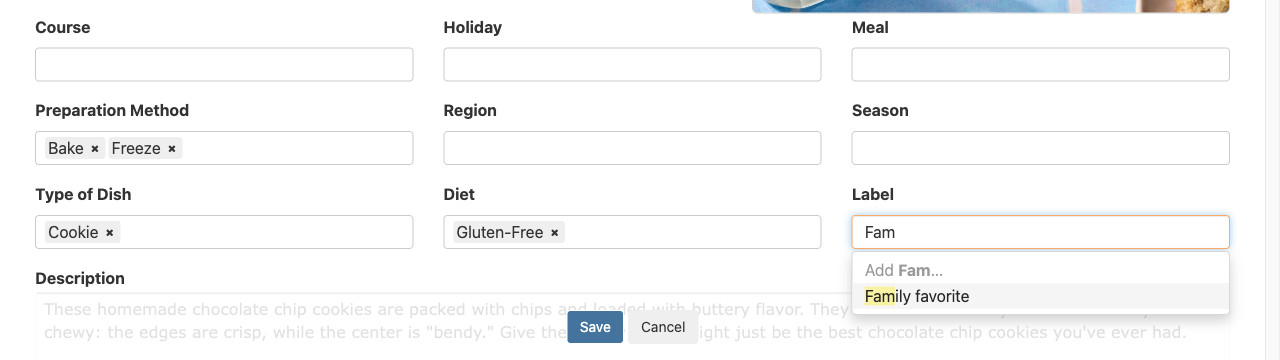
When you save a recipe from the web or a cookbook, r.ecip.es suggests tags such as course, region and season. Change them in the edit form.
- To add your own tag, type it into any tag box, or into Label, and save. Labels are good for things like "Grandma's" or "Weeknight".
- Click the × on a tag to remove it from the recipe.
- A label no recipe uses goes away on its own.
Search and filter
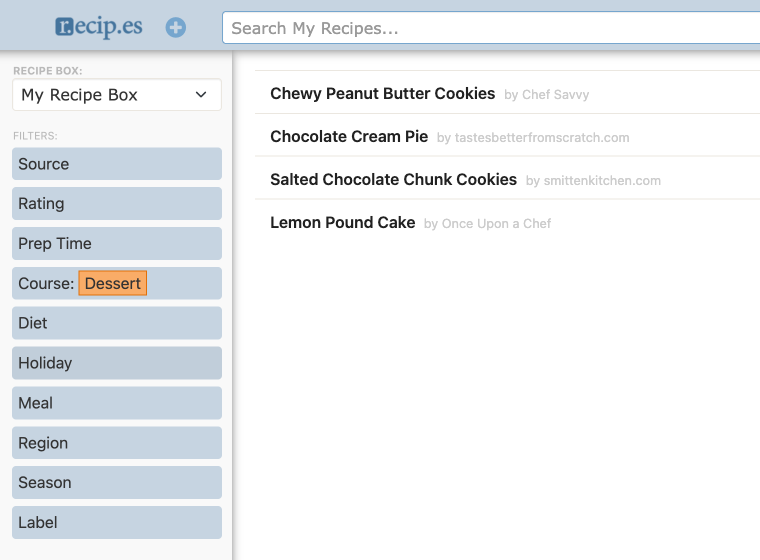
Type in the search box to look through titles, ingredients, steps, sources and tags. In the left panel, Filters narrow the list by tag, source, rating or time. Choosing several tags shows recipes that have all of them. When you have many sources, type part of a name in the box at the top of Source to find one, and press Enter to pick the first match.
Delete or copy a recipe
- To delete a recipe, click its menu (), choose Delete and confirm.
- In a recipe box shared with you, choose Save a copy to copy a recipe into your own recipe box.
Print or email a recipe
Choose Print or Email from the recipe's menu ().
Still stuck? Email support@r.ecip.es.