
Emails from r.ecip.es
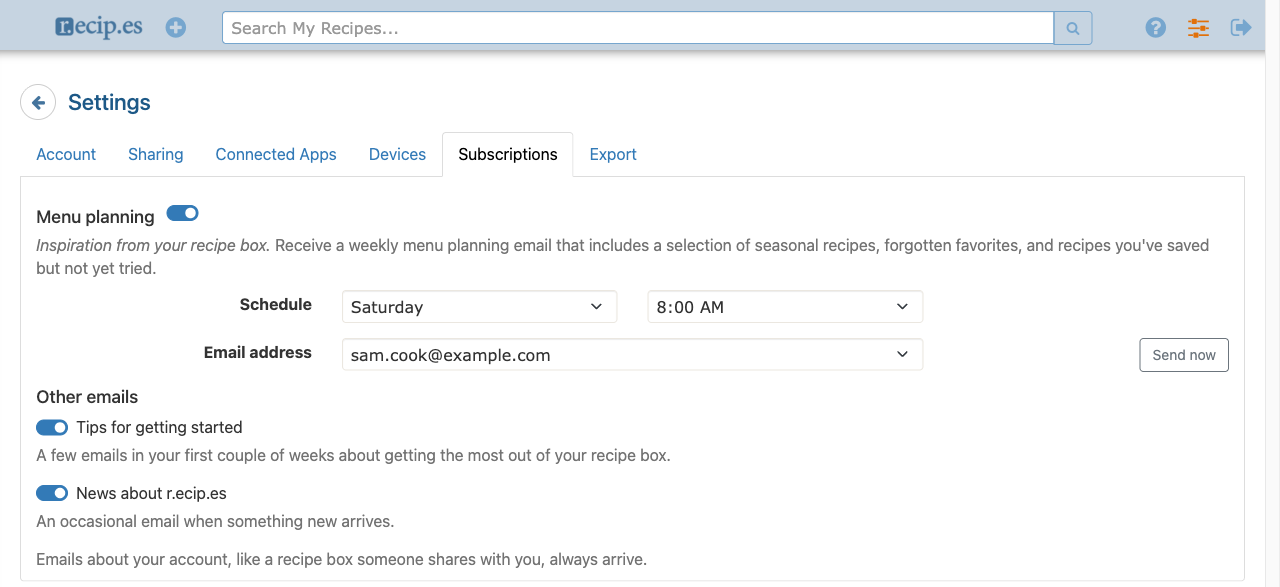
To choose which emails you get, click Settings (), then Subscriptions. Every optional email has an unsubscribe link that works without signing in.
The weekly menu email
"What to cook this week" suggests recipes from your recipe box: favorites rated 4 or higher, seasonal vegetables and desserts, and recipes you haven't rated yet.
- Turn on Menu planning. It's available once you've saved 10 recipes.
- Choose the day and hour under Schedule. Times are in the time zone set in Settings, then Account.
- Choose the Email address it goes to: your account's address or a confirmed one you added.
Click Send now to get one straight away. r.ecip.es skips a week when it has too few recipes to suggest.
Tips and news
Tips for getting started are a few emails in your first couple of weeks. News about r.ecip.es is an occasional email when something new arrives. Turn either off in Subscriptions.
Emails about your account, such as a recipe box someone shares with you or replies to recipes you email in, always arrive.
Unsubscribe without signing in
Click Unsubscribe at the bottom of the email. The page that opens asks before it changes anything. From a tips or news email, you can also choose Unsubscribe from all r.ecip.es emails. Changed your mind? Click Re-subscribe on the same page, or turn the email back on in Subscriptions.
Still stuck? Email support@r.ecip.es.